English
Sometimes, building an environment starts with smart modular design. For this project, I used a small set of optimized materials and trim sheets to keep things efficient while ensuring high texel density and flexibility for customization.
In this post, I’ll break down my workflow step by step, from gathering references to assembling the final scene, and share insights into the techniques and decisions behind the process.
Español
Construir escenarios de gran tamaño, no es tarea fácil. Para este proyecto, diseñé una serie de materiales con trimsheets y modulos para mantener un rendimiento optimo mientras aseguro una alta densidad de texeles y flexibilidad para personalización.
En esta publicación, desglosaré mi flujo de trabajo paso a paso, desde la recopilación de referencias hasta la creación de la escena final, y compartiré tips sobre las técnicas y decisiones detrás del proceso.

Gathering References / Recopilar Referencias
English
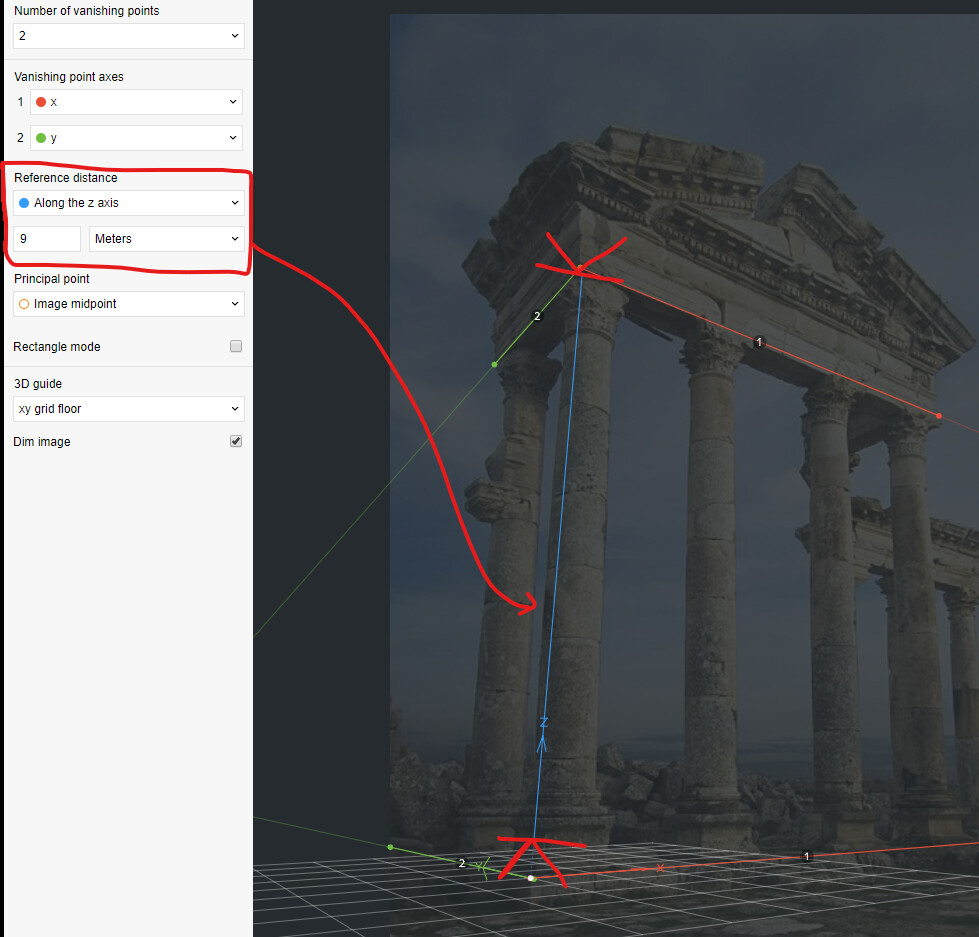
I recommend getting at least this type of references (of course adapt this information to your project needs):
- Real Life: Real-life references provide a tangible basis for proportions and details.
- Concept: Helps to clarify the creative vision.
- Breakdown: Allow you to analyze successful designs and understand their structure, leading to better-informed decisions.
- Technical: This helps you stay mindful of the project's technical requirements, such as polycount, efficient texture usage, and how other artists have approached similar challenges.
- Target Style: Help you maintain consistency in aesthetics.
During this stage, it's crucial to identify the fundamental and core elements that will form part of your assets.
Español
Durante este proceso, si no sabes que tipo de referencias necesitas, recomiendo usar la siguiente lista como punto de partida.
- Vida real: Las referencias de la vida real proporcionan una base tangible para las proporciones y los detalles.
- Concepto: Permite aclarar la visión creativa (de ser necesario).
- Desglose: Ayuda a analizar casos de éxito y comprender su estructura, lo que lleva a tomar decisiones mejor informadas.
- Técnico: Ayuda a estar atento a los requisitos técnicos del proyecto, como el recuento de polígonos, uso eficiente de texturas y cómo otros diseñadores han abordado desafíos similares.
- Estilo objetivo: Ayuda a mantener la coherencia en la estética.
Durante esta etapa es crucial identificar los elementos fundamentales que formarán parte de tus assets.

Blockout
English
For the Blockout process, I decided to build the most basic elements that can represent this type of structure. I focused solely on constructing one of the corners and used modifiers to create the rest of the structure:
- Mirror (multiple instances to repeat pieces at 45-degree angles and ensure symmetry),
- Array (to create just one element and repeat it multiple times, such as the tiles and patterns seen at the top of the structure),
- Boolean (to cut the tiles at each corner; at this stage, it’s not necessary to do it manually),
- Lattice (to create the curvature effect wherever needed)
Español
Para el proceso de Blockout, decidí construir los elementos mas básicos con los que se pueden representar este tipo de estructuras, me enfoqué solamente en construir una de las esquinas y utilizar modificadores para crear el resto de la estructura:
- "Mirror" (múltiples de estos para repetir las piezas a 45 grados y en simetria),
- "Array" (para soalmente crear un elemento y repetirlo multiples veces, como las tejas y los patrones que se aprecian en la parte superior de la estructura),
- "Boolean" (para cortar las tejas en cada esquina, en este punto no es necesario hacerlo manualmente),
- "Lattice" (para crear el efecto de curvatura donde sea necesario.)

English
I also used modifiers for special pieces, such as those supporting the roofs, using Solidify to quickly add volume. At this stage, I’m not concerned with creating fully optimized geometry since I’m certain I will make multiple changes. It’s important to remember that this is a very early stage, and the most important thing is to achieve the correct measurements.
Español
También utilicé modificadores para piezas especiales como las que soportan los tejados, usando "Solidify" para obtener el volumen de una manera más rápida. En este punto no me preocupo por crear una geometría 100% optimizada pues estoy seguro que realizare múltiples cambios, es importante recordar que esta es una etapa muy temprana y lo mas importante es obtener las medidas y el look & feeling correctos.

English
Another modifier I used during this stage was Screw, which is typically used to create revolved structures. However, I’ve learned that it can also be used to create tubular structures with a square profile, as is the case with the pattern found on the railings.
By using this group of modifiers, I can completely change the shape of this pattern in just a few adjustments. I applied this same principle, known as "non-destructive," to create most of the pieces in this project. (The only downside is having to clean up the geometry before starting the UV mapping process.)
Español
Otro modificador que utilicé durante esta etapa fue "Screw" que normalmente se utiliza para crear estructuras en revolución, pero he aprendido que tambien sirve para crear estructuras tubulares de perfil cuadrado como es el caso del patrón que se encuentra en los barandales.
Al usar este grupo de modificadores, puedo cambiar completamente la forma de este patrón en unos cuantos movimientos.
Utilicé este mismo principio al que llaman "non-destructive" para crear la mayoria de las piezas en este proyecto. (la única desventaja es cuando tienes que limpiar la geometría antes de comenzar el proceso de UVMapping.)

English
Another aspect I considered during this process was modularity. All the objects are aligned within a 3D grid divided into meter units. This helped ensure that the elements were always contained within units that could be divided and combined later.
This "rule" is simply a 1-meter x 1-meter cube set to "wireframe" display mode, along with a couple of Array modifiers.
Español
Otra cosa que tomé en cuenta durante este proceso fue la modularidad, todos los objetos se encuentran dentro de una rejilla 3D divida en unidades de metros, esto me ayudo a que en todo momento, los elementos estuvieran contenidos en unidades que pudiera dividir y combinar mas tarde.
Esta "regla" es simplemente un cubo de 1 metro x 1 metro con modo de visualización "wire" y un par de modificadores de "Array".

TRIM SHEET BLOCKOUT
English
For this project, I created 4 trimsheets containing all the materials needed, such as wood, roof tiles, metal, decorations, and more.
Español
Para este proyecto, creé 4 trimsheets que incluyen todos los materiales necesarios, como madera, tejas, metal, decoraciones, entre otros.


English
To determine how much space each element would occupy, I first created a blockout of the basic pieces to have a reference for measurements.
Español
Para definir cuánto espacio ocuparía cada elemento, primero realicé un blockout de las piezas básicas, lo que me permitió tener una referencia de medidas.

English
After completing the blockout, I placed a 4x4 meter plane with a 4096x4096 pixel texture. This approach helped me maintain a good pixel density, even when reducing the texture to 256x256 pixels. Using this plane, I realized it was possible to fit almost all the wooden elements (floors, columns, and beams) into a single texture set.
Español
Después de finalizar el blockout, utilicé un plano de 4x4 metros con una textura de 4096x4096 píxeles. Esta estrategia me ayudó a mantener una buena densidad de píxeles, incluso al reducir la textura hasta 256x256 píxeles. Gracias a este plano, descubrí que era posible incluir casi todos los elementos de madera (pisos, columnas y vigas) en un solo set de texturas.

English
I then moved on to the remaining necessary elements, such as tiles, metallic components, walls, and stone floors. I applied the same principle to all the materials, ensuring a minimum pixel density of 10.24 px/cm.
Even decorative objects make use of these reusable textures, which also allows the project’s look to be completely changed simply by modifying a few images.
Español
Mas tarde continué con el resto de los elementos necesarios, como tejas, componentes metálicos, paredes y pisos de piedra. Apliqué el mismo principio a todos los materiales, asegurándome de mantener una densidad mínima de 10.24 px/cm.
Incluso los objetos decorativos reutilizan estas texturas, lo que permite cambiar completamente el aspecto del proyecto simplemente modificando algunas imágenes.
UV MAPPING
English
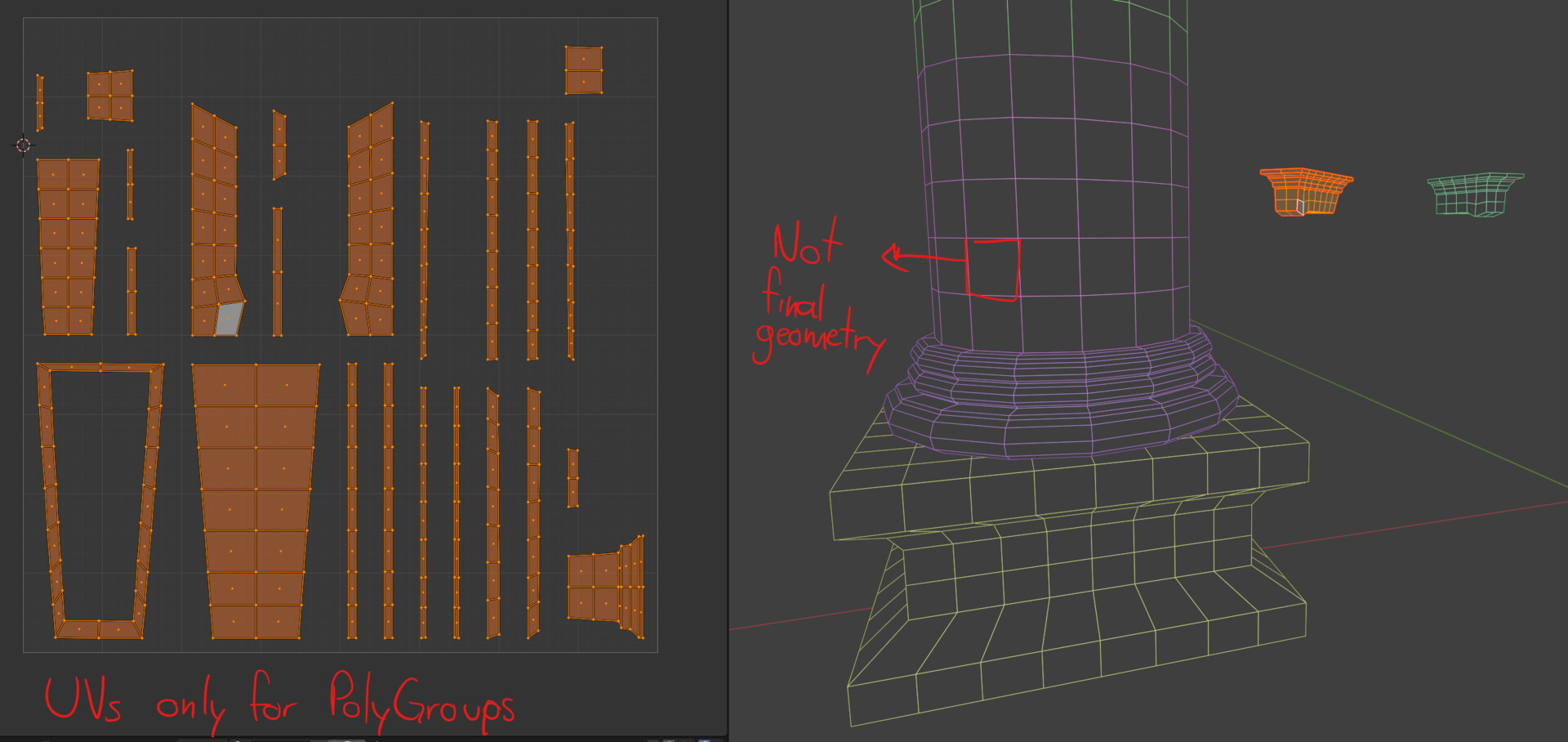
At this stage, I focused on separating the fundamental pieces necessary to build the project. Once identified, I readjusted each module to the reference rule mentioned earlier and created the UVs for each one, taking into account the required texel density. Although I didn’t have the final trimsheets yet, I already had a preliminary layout for each one. This layout was created using screenshots of random textures that suited my needs.
Having these early trimsheets is helpful, as they allow for the creation of UVs for the pieces and provide a clear idea of the texture repetition they will have.
In parallel with this process, I cleaned up all pending geometries, minimizing the number of polygons. At this stage, I didn’t worry about achieving perfect triangulation or quads; I simply ensured there were no excessively stretched n-gons, as these can cause issues during triangulation, leading to very small triangles that can negatively impact textures and lightmaps in some engines.
Español
En esta etapa, me dediqué a separar las piezas fundamentales necesarias para conformar el proyecto. Una vez identificadas, ajusté nuevamente cada módulo a la regla de referencia mencionada anteriormente y creé las UVs para cada uno, tomando en cuenta la densidad de píxeles requerida. Aunque aún no tenía los trimsheets finales, ya contaba con un layout preliminar para cada uno. Este layout fue creado utilizando capturas de pantalla de texturas aleatorias que se adaptaran a mis necesidades.
Contar con estos trimsheets tempranos es útil, ya que permiten crear las UVs de las piezas y tener una idea clara de la repetición que tendrán las texturas.
Paralelamente a este proceso, limpié todas las geometrías pendientes, reduciendo al mínimo el número de polígonos. En este punto, no me preocupé por triangulaciones o cuadrículas perfectas; simplemente me aseguré de evitar n-gons excesivamente estirados, ya que pueden causar problemas al triangulárselos, generando triángulos demasiado pequeños que pueden afectar negativamente las texturas y los lightmaps en algunos motores.

English
To optimize the time spent on this process, I used the free "Texel Density Checker" tool for Blender. This allowed me to ensure uniform density across all modules.
A very useful tip during this process is to use a "checker" texture on your material. It doesn’t need to be connected to any node; simply keep it selected, and while in solid view mode, choose the "Texture" option. This lets you keep your material intact for proper visualization in renders or previews, while also checking pixel density in solid mode without constantly connecting and disconnecting different textures.
Español
Para optimizar el tiempo dedicado a este proceso, utilicé la herramienta gratuita "Texel Density Checker" para Blender. Esto me permitió asegurar una densidad uniforme en todos los módulos.
Un consejo muy útil durante este proceso es usar una textura de "checker" en tu material. No es necesario conectarla a ningún nodo; simplemente mantenla seleccionada y, mientras estés en el modo de visualización sólido, selecciona la opción "Texture". Esto te permitirá mantener tu material intacto para visualizarlo correctamente en renders o previsualizaciones, al mismo tiempo que observas la densidad de píxeles en el modo sólido, sin tener que conectar y desconectar diferentes texturas constantemente.


Texture Creation / Creación de Texturas
English
To create the textures, I used two methods.
One of them involved ZBrush, Marmoset Toolbag, and Substance Painter, following a workflow very similar to that used for prop texturing. The main difference in this case was considering that the baked textures would be reused numerous times across different modules. Therefore, it was important to avoid creating details that were too unique or stood out excessively from the rest of the texture.
Additionally, it’s essential to ensure that the trimsheet is horizontally tileable, meaning that the details created on the edges of the pieces must be repeated on their counterpart to achieve a seamless transition.
Español
Para crear las texturas, utilicé dos métodos.
En uno de ellos, empleé ZBrush, Marmoset Toolbag y Substance Painter, siguiendo un flujo de trabajo muy similar al de texturizado para props. La principal diferencia en este caso fue considerar que las texturas bakeadas serían reutilizadas numerosas veces en diferentes módulos. Por ello, era importante evitar la creación de detalles demasiado únicos o que sobresalieran del resto de la textura.
Asimismo, se debe tener en cuenta que el trimsheet será tileable de manera horizontal, lo que significa que los detalles creados en los bordes de las piezas deben repetirse en su contrapartida para lograr una transición perfecta.


English
For the second method, I used Substance Designer, as this program makes it easier to create textures like stone, walls, and others. Additionally, it allows for much simpler generation of variations and divisions when needed. Although this process takes a bit more time to build the base structure of the texture, once the material is ready, creating variations is just a matter of a few clicks.
Español
Para el segundo método, utilicé Substance Designer, ya que este programa facilita la creación de texturas como piedra, paredes, entre otras. Además, permite generar variantes y divisiones de manera mucho más sencilla cuando es necesario. Aunque este proceso requiere un poco más de tiempo para construir la estructura base de la textura, una vez que el material está listo, crear variantes se reduce a un par de clics.


English
When working on texturing for scenes or environments, it’s essential to use a workflow that provides a high level of flexibility and editability. Thanks to the workflows I used, I can completely change the look of the entire project in just a few minutes.
Español
Cuando trabajas en el texturizado de escenarios o ambientes, es fundamental utilizar un flujo de trabajo que ofrezca un alto nivel de flexibilidad y capacidad de edición. Gracias a los workflows que empleé, puedo cambiar por completo el aspecto de todo el proyecto en cuestión de minutos.

Sample Project Creation / Creación del Proyecto Muestra
English
Once the textures were created, it was simply a matter of placing the new textures into the materials previously assigned during the UV creation process.
To demonstrate the functionality of these modules, I built a scene with very different structures. This helped me identify modularity issues and create some missing pieces to fill complicated areas, such as roofs in interior corners or fillers for curved tiles on the roofs.
During this process, the use of instances is crucial, as the polygon count can increase drastically in no time. Thanks to an asset library I created within Blender, it wasn’t necessary to make adjustments in the project; I simply dragged and dropped the assets I needed from the library into the 3D view.
Español
Una vez creadas las texturas, solo fue cuestión de colocar las nuevas texturas dentro de los materiales previamente asignados durante el proceso de creación de UVs.
Para demostrar la funcionalidad de estos módulos, construí una escena con estructuras muy diferentes entre sí. Esto me ayudó a identificar fallos de modularidad y a crear algunas piezas faltantes para rellenar áreas complejas, como tejados en esquinas interiores o rellenos para tejas curvas en los techos.
Durante este proceso, es muy importante el uso de instancias, ya que el conteo de polígonos puede aumentar drásticamente en poco tiempo. Gracias a una biblioteca de assets que creé dentro de Blender, no fue necesario hacer ajustes en el proyecto; simplemente arrastré y solté los assets que necesitaba desde la biblioteca a la vista 3D.

English
One of the advantages of creating assets using this workflow based on textures, instead of procedural textures, is its compatibility with multiple engines, whether Unity, Unreal, Blender, or any other.
Español
Una de las ventajas de crear assets utilizando este workflow basado en texturas, en lugar de texturas procedurales, es su compatibilidad con múltiples motores, ya sea Unity, Unreal, Blender o cualquier otro.


Thanks!
Thank you for taking the time to read through my process. I hope this insight into my workflow and techniques helps inspire your own creative journey. If you have any questions or thoughts, feel free to reach out. Happy creating!
Gracias por tomarte el tiempo de leer sobre mi proceso. Espero que esta información sobre mi flujo de trabajo y técnicas te inspire en tu propio camino creativo. Si tienes alguna pregunta o comentario, no dudes en contactarme. ¡Felices creaciones!